Applications that run on Windows Vista should be capable of running as a limited
user for normal operation, and request elevation when the application needs to accomplish
privileged tasks. This affects the updating process because unlike Windows XP, even
administrative users who start your application without explicitly requesting administrative
privileges will not have permissions to successfully update your software. When
architecting your update process to work in Windows Vista, this must be taken into
consideration. With AppLife Update, your options include:
1. Install your application 'per user' by installing into the user’s personal folder
structure. Doing so will ensure your user has sufficient permissions to update application
files without requiring elevation.
2. Utilize the optional AppLife Update Windows Service. When the service is used,
your updates are securely executed by an already privileged process. This option
has the significant benefit of allowing true limited users to update your software.
In this configuration, no UAC prompts are presented.
3. Require your application to be launched “as administrator” in order to apply
an update.
4. Initiate a new process that requests UAC elevation to apply an update. This lab
will show how to accomplish this task. Integrating the presented solution allows
administrators to seamlessly apply updates to your applications in Windows Vista
without first launching your application as an administrator.
The solution in this lab uses an Update Controller within the host application to
check for and download updates. But before applying the update, we’ll determine
whether the host environment is Windows Vista with the UAC enabled. (It is possible
to disable the UAC) If so, then we’ll ask the user for permission to elevate.
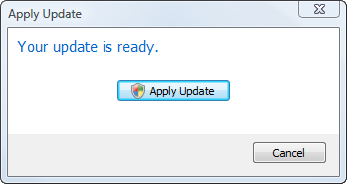
When the user initiates the update process on Windows Vista, a UAC Prompt is then
expected. We'll cause a UAC elevation by starting a new application process that
is manifested to require administrator permissions. Within this small executable,
the OverrideHostProcess method of the Update Controller is used to initiate
an update on behalf of your primary application.
The executable project that will apply the update on behalf of the primary host
application causes a UAC elevation by being built with an assembly manifest that
applies the requestExecutionLevel attribute. In Visual Studio 2005, embedding
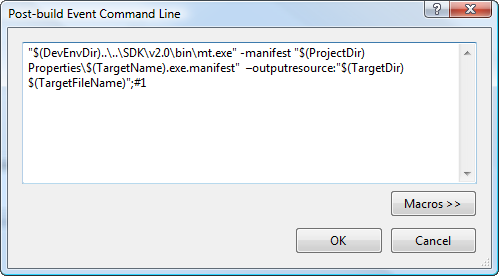
an assembly manifest requires the use of the mt.exe utility. The Post Build action
of the Launch Update project includes the use of this utility to embed the manifest
into the executable.
<?xml
version="1.0" encoding="utf-8" ?>
<assembly
xmlns="urn:schemas-microsoft-com:asm.v1" manifestVersion="1.0">
<assemblyIdentity version="1.0.0.0"
processorArchitecture="x86"
publicKeyToken=""
name="LaunchUpdate"
type="win32" />
<trustInfo xmlns="urn:schemas-microsoft-com:asm.v2">
<security>
<requestedPrivileges>
<requestedExecutionLevel level="requireAdministrator" />
</requestedPrivileges>
</security>
</trustInfo>
</assembly>
Before an update is applied, we determine whether the client is running in Windows
Vista using the Environment objects OSVersion property. If this property
is version 6, the current operating system is Windows Vista.
To determine whether the UAC is enabled, we look for the EnableLUA registry
value within the HKEY_LOCAL_MACHINE\Software\Microsoft\Windows\CurrentVersion\Policies\System
registry key. The presence of the value with a value of 1 indicates the UAC is enabled.
If this is the case, we ask the user for permission to proceed with applying the
update, which will lead to a UAC prompt. Otherwise, we just initiate the update
process.
The button that will cause an elevated process is adorned with the UAC Shield Icon.
Doing so complies with the Microsoft Design Requirements for Vista UAC Compatibility.
To accomplish this we used the BCM_SETSHIELD Windows message.
To present the friendly UAC prompt, properly indicating your company as the publisher
of this program requires the executable that is being launched to be code signed.
Though this process is not required, the alternate UAC prompt could cause concern
for your users.
Build and sign the Launch Update executable using the SignTool.exe utility and your
own code signing certificate to appropriately identify your application.
To initiate a UAC elevated update process, we start the LaunchUpdate.exe program
that is manifested for elevation, passing in the current version of the host application.
The application simply sets up an Update Controller to apply the update on behalf
of the host application.
In conclusion, implementing a solution like this into your application will allow
privileged user who run your application on Windows Vista to initiate an update
while running your host application with limited permissions.
Windows Vista is a registered trademark of the Microsoft Corporation.
Download AppLife Update Here